


TABLE OF CONTENTS
WEBSITE PERFORMANCE OPTIMIZATION
HOW TO IMPROVE WEBSITE PERFORMANCE
WEBSITE PERFORMANCE OPTIMIZATION
Well, let’s question. Do we think optimization of website performance is one of the most important things to concentrate on while implementing a website? No doubt, the answer will be “yes”. When the answer is yes, let's get the justification by diving into website performance optimization in depth.
Website performance optimization is the process of improving a website's speed and responsiveness. It also outlines the extent to which the website is reliable, interactive, and easy to use.
First impressions are greatly influenced by a website's performance, which is defined as how quickly the site loads and turns into an interactive browsers.
Website performance optimization is the key factor of SEO
Optimizing website performance can be beneficial in the following ways:
- Higher conversion rate.
- Lower bounce rate.
- Improved user experience.
- Improves the website ranking.
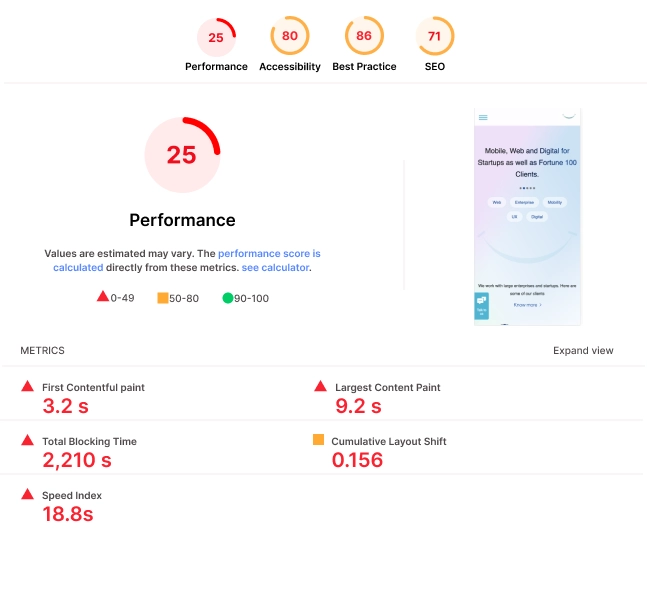
For any website or web app to improve performance, understanding the performance metrics plays an important role. The performance metrics list is as follows:
Largest Contentful Paint, Cumulative Layout Shift, Speed Index, First Contentful Paint, and Total Blocking Time.
Every metric has a label and a score.
- Good is indicated with a green circle.
- A square with amber information indicates areas that need improvement.
- A red warning triangle denotes poor quality.
HOW TO IMPROVE WEBSITE PERFORMANCE AND SPEED
Performance or speed can be improved in the following ways:
- Optimize Images - The most important thing to take into consideration during the initial implementation of the website. Because of several images being loaded initially and the size of an image, performance will be affected very easily. Images can be optimized using the following ways:
- Compressing images before adding them to your site can save precious weight and time. TinyPNG is the best compression tool that can be used to compress images without losing the quality of an image. Image can be of different formats PNG or jpg or jpeg.
- Convert to web format once the image is compressed successfully using TinyPNG.
- Make sure to render the images using a picture tag.
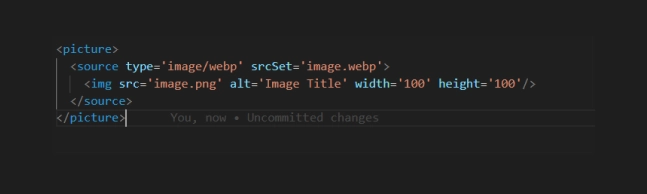
- Limit the Number of HTTP Requests - Webpages require browsers to make multiple HTTP requests for various assets on the page, including images, scripts, and CSS files. A web page's overall load time may increase with each request since it requires a round-trip from the browser to the server to maintain the resource.
- A minimum amount of assets should be required for each page to load overall.
- Use Browser HTTP Caching - The browser cache is a temporary storage location where browsers save copies of static assets so that they can load recently visited webpages more quickly. It reduces the amount of data that the server needs to transfer to the browser, shortening load times for users who frequently visit certain pages.
- Avoid Usage of External Libraries - Usage of external libraries for development purposes, must be avoided. Where usage of external libraries can affect the performance metrics scores, mainly with CLS and LCP. Since loading the elements which are dependent on external resources needs to communicate with external servers to get the response.
- Minify CSS and JavaScript Files - Minifying CSS and JS files plays an important role in achieving First Contentful Paint and Largest Contentful Paint Scores. It removes code comments, whitespace, and unnecessary semicolons. By doing this, you can speed up the browser's loading of CSS and JavaScript files.
- Lazyload Third-Party Links - Third-party links like Google Tag Manager, External Chatbot, and Google Translate be loaded using the concept of imperative programming. It's one of the most beneficial methods to achieve performance at a high scale.
- Load the Contents on Isolation - While loading the section on the webpage, analysis of the above fold and below fold plays a major role. If the section is visible on the above fold, we need to prioritize the loading section during the initial load. If the section is related to the below fold, we need to show the content on isolation.
- Isolation is a concept where we load the section of the web page as soon as we reach that section on scroll. We can achieve this process using the concept of Intersection observer API.
- Use Effective Third-Party Services - Need to make sure we use effective third-party services for Hosting, DNS and CDN.
- Hosting - A website developed with proper protocols will load slowly if its origin server responds slowly to requests. A server with a response time of less than 200 ms on average is what website owners should select.
- DNS - Website owners should choose DNS services that deliver results quickly and reliably, rather than relying on their web host’s DNS.
CDN - Website owners should use a content delivery network (CDN) to cache web content in many locations around the world, so user requests do not have to travel hundreds or thousands of miles to get to the origin server of the website.
There are a lot of performance tools available to monitor the performance of the site. We will consider a few tools which give accurate results of the site:
Page Speed Insights - Google's PageSpeed Insights tool, another popular testing option for marketers, evaluates your website's performance on mobile and desktop platforms. It is powered by Lighthouse and has a total score ranging from 0 to 100; anything above 80 is regarded as high-performing.
Page Speed Insights provides both lab and field data about a page. Due to the controlled environment in which it is collected, lab data is helpful for debugging issues. It might miss bottlenecks in the actual world, though. Field data can be used to record actual user experiences in the real world.
GTMetrix - GTMetrix is another alternative to Google Lighthouse or page speed insights. Which provides in-depth information about performance and load speed. It provides information with speed visualization and video recordings. The only concern is the need to get the subscription once the trial period ends.
Pingdom - Pingdom another popular testing option for marketers, evaluates your website's performance on mobile and desktop platforms. It provides dependable and reasonably priced uptime and performance tracking for your website.
Debugbear - Debugbear is another helpful tool, that helps in speeding up the website and meets Google's Core Web Vitals criteria. It shows the information in depth with lab data, field data, and web vitals information.
HOW DO I FIX A SLOW WEBSITE
It's always important to follow protocols and procedures during the initial implementation of the site. That leads to getting the output of the website as expected in terms of speed and performance. But what if the website is already implemented and the result of the website is very slow?
Reaching high performance or getting load speed with 3 seconds or 5 seconds as per SEO Standards of the implemented site is the toughest thing we could face.
At least to reach the performance or improve the speed of a slow website we should follow a few steps:
- Optimizing images can fix some major performance issues of the website.
- lazyloading third-party links such as GTM and external chatbot with imperative programming can help in improving the performance.
- third-party libraries which are used to achieve small functionalities can be removed and rewritten function with just vanilla js.
- Minifying CSS and JS can reduce the enormous network payload size.
- Preloading LCP content can improve performance.
- Load the below fold content on isolation.
Following the above steps can improve the performance up to a certain level like 70 - 80. Where to achieve the maximum performance of the already implemented site is one toughest parts, since there might be a few libraries like jQuery which will be used everywhere and dependency is created in the entire website. This might be one of the reasons behind not getting maximum performance.
WHY IS WEB SPEED SO SLOW?
There can be several reasons behind slow web speed. Let's list out a few reasons behind this slow web speed:
- Failure in the usage of effective third-party services for hosting, DNS, and CDN (content delivery network).
- Images are not optimized with proper compression and serving images with next-gen format eg: web.
- Failed to lazyload GTM, Google Translate, and external chatbot with imperative programming concepts.
- Failed to Lazyload JS and CSS files related to the below fold.
- Increase in the number of HTTP Requests during the initial load of the webpage.
- Static assets are not served in the cache policy.
- Usage of third-party libraries to achieve minimal functionality, which can be achieved with vanilla javascript.
WHAT IS GOOD WEB SPEED

A good website speed is generally considered to be under two seconds. For Google, two seconds or less is considered a fast loading time.
A page should load in between 0 and 2 seconds, but 3 seconds is also regarded as a respectable time. Anything more than three seconds makes people more likely to abandon your website.
IMPORTANCE OF WEBSITE SPEED
- Having good website speed improves a website’s ranking in search results.
- It improves user experience. User experience is the big reason that search engines think website speed is such an important factor, and that's why it's part of their ranking algorithms.
- It affects your conversion rate. Website speed greatly affects the conversion rate, so the value that shows how many users visit a website to complete their goal.
- It influences how likely people are to share your website.