talk to us

Talk to us

Talk to us

Call us at :+91 960 622 2779

Or, let us contact you

×

Please enter the Name

Please enter the Company Name

Please enter the Email ID

Please enter the Phone Number

Please enter the Location

Please select an option

Please enter the Details

Please verify captcha

Manoramanews - Appiness Interactive
Top
June 01, 2021 7 minutes read

How Cognitive Psychology can help in UX design

Blogs author avatar

Posted by:
Tashima Kumar

Have you ever been overwhelmed by too much information on a presentation slide?

Being shown too much information or choices can be hard to process in one go. Our minds have limited processing power and when it exceeds our limit, it leads to a high cognitive load.

As UX Designer in Bangalore, it is our job to reduce the effort required to process information and make it as user-friendly as possible. We make websites functional, enjoyable, and easy to use.

We need to identify bottlenecks that increase cognitive load and help users overcome these barriers. Following are the application of Cognitive Psychology in UX that may make it easier for you to understand the dynamics of the phenomena,

Types of cognitive load

1. Intrinsic - Additional effort required to process new information while also having an overview of the outcome

2. Extraneous - load generated on the user by the way information is presented, in design, it could be the use of too many colors or different font sizes

Let us look at the principles associated with cognition

Cognitive Load

1. Number of choices

The working memory of an average person can hold 7-9 items at a time' - Miller's Law. The information can be organized in smaller chunks, it can be processed and understood with less effort to complete the task.

Limit the number of choices to what works well with your product.

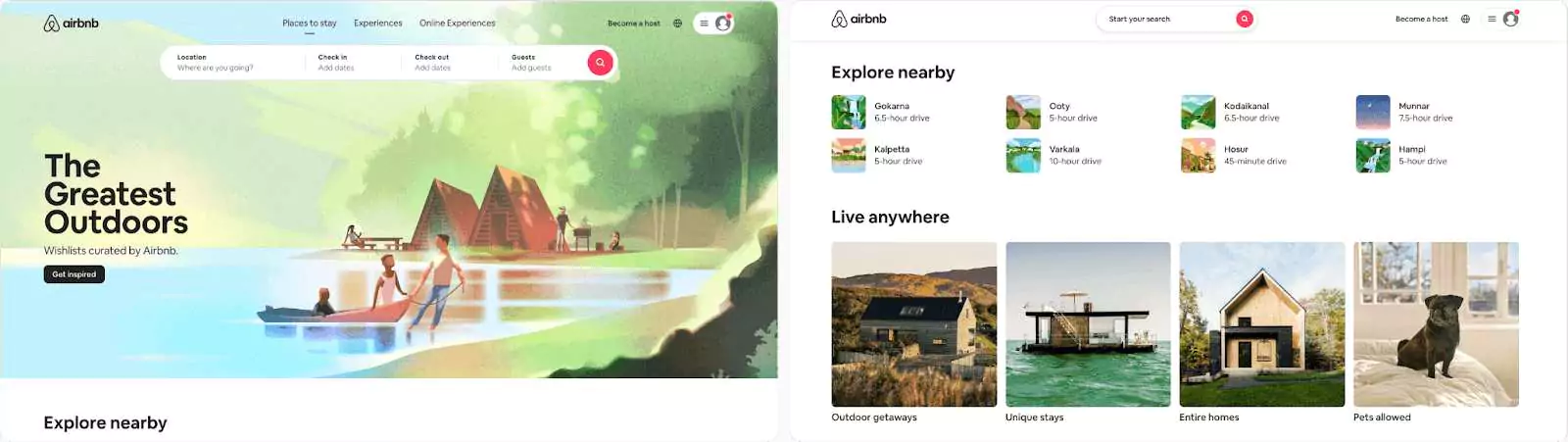
Eg: Airbnb allows you to search for what you are looking for by highlighting the search area. It then provides you with relevant information like destinations, stays, and experiences
UX Designer in Bangalore

2. Amount of thought

Users have expectations when they visit your website based on experiences or time spent on other well-known websites.

It is best to use standard conventions wherever possible. Users will make faster decisions when they understand your website without having to learn something new.

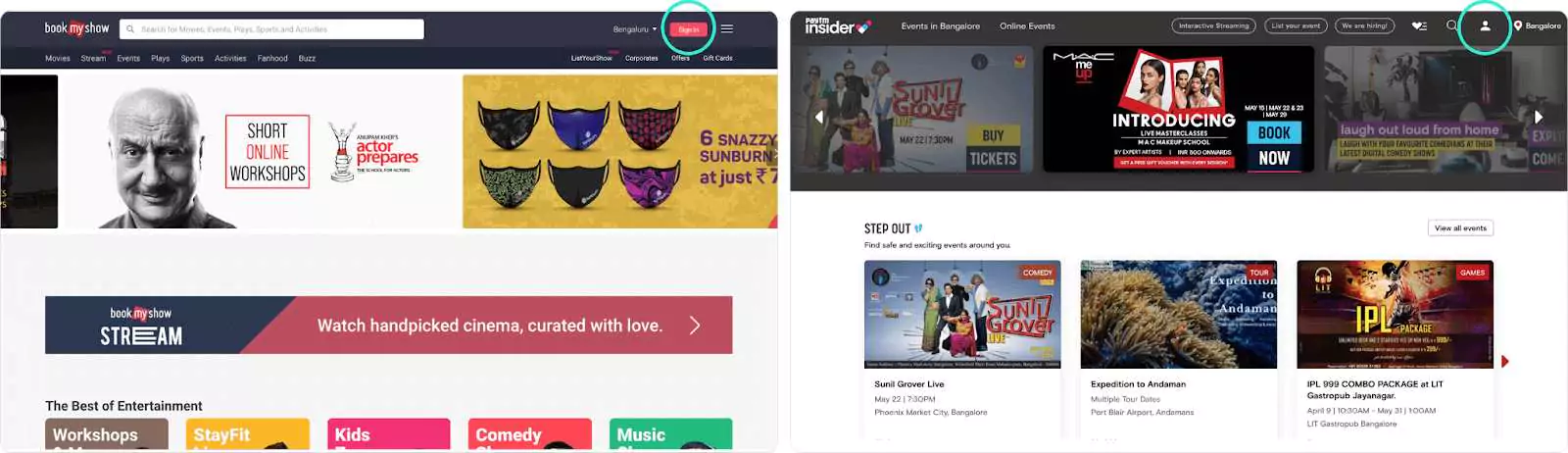
For example, the Sign in and Register button is placed on the top right corner of the page on most websites. When we look at the Insider website, it takes a few seconds to find the sign-in/Register button as there is no label placed below the icon whereas in Book my show the button is quite evident.
Best UX Designer in Bangalore

3. Confusion and choice

Showing your user all the options at a glance can lead to confusion or frustration.

If your tabs/navigation have more than 10 options available, it is best to show a few upfronts and hide the others with the option to view more.

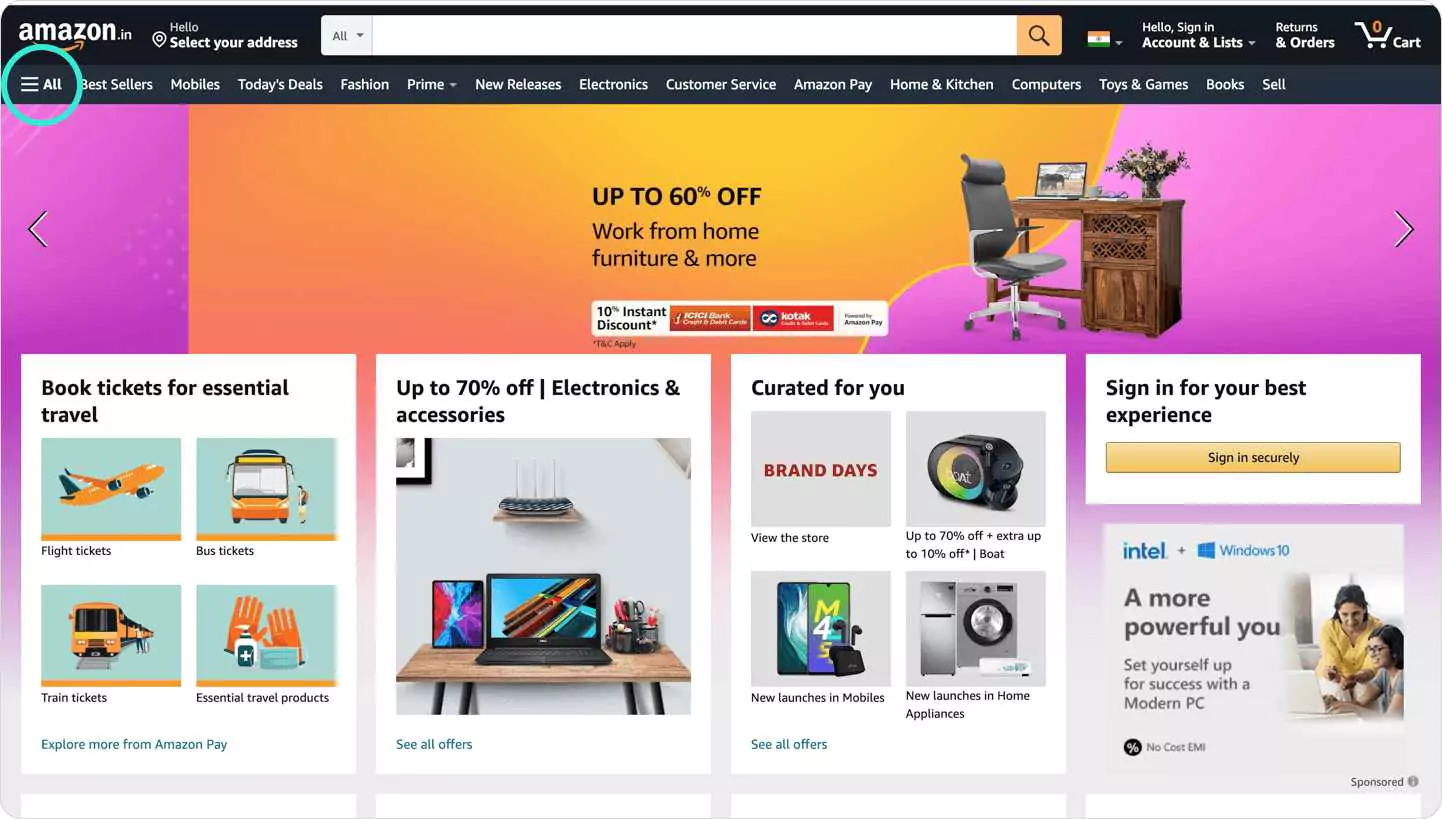
Eg: Amazon has implemented this well, showing few popular options and the rest can be accessed from the hamburger menu.
Cognitive Psychology in Ux

Cognitive Barrier

A cognitive barrier is something that prevents the user from performing the action required to complete their task

1. Number of steps

It is essential to know when to have many steps and when not to. Include only relevant information with no redundancies.

At times it is better to have more steps with a low cognitive load than to have fewer steps that make it too cluttered adding on to the user's working memory.

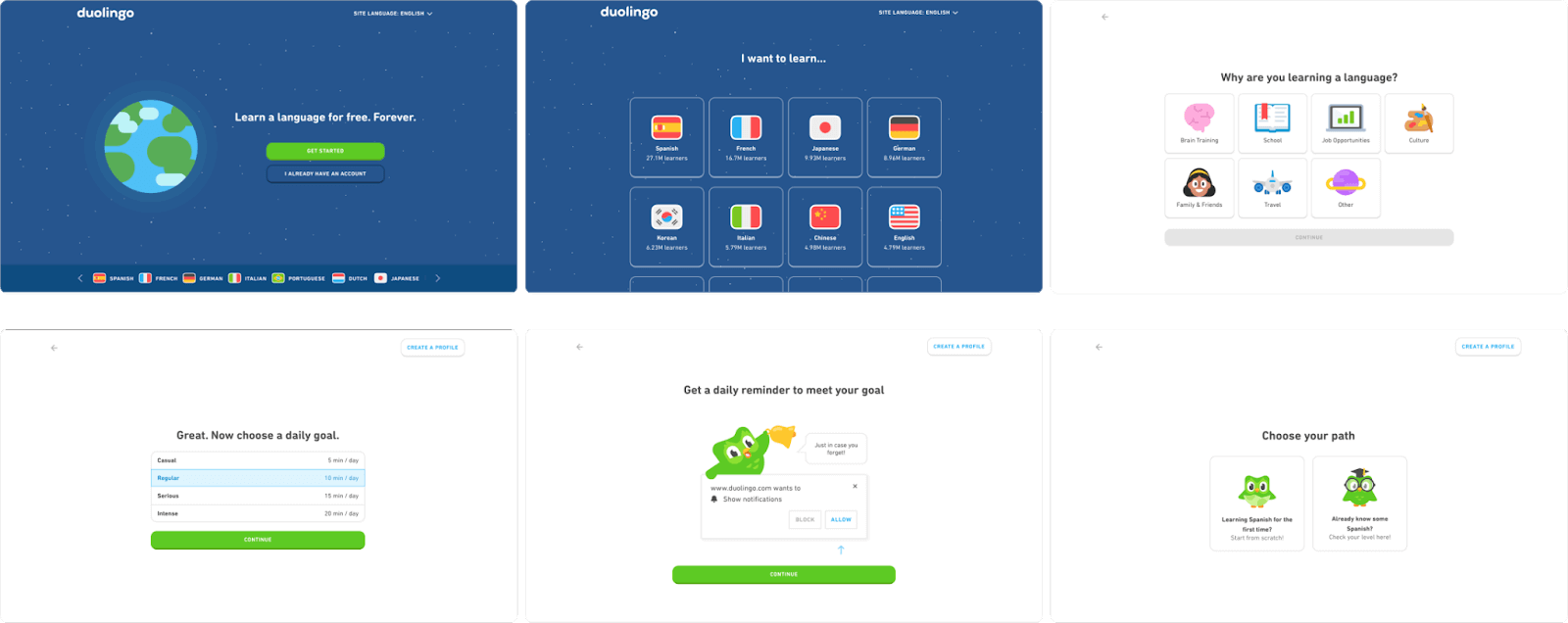
Eg: Duolingo's onboarding process is spread out into many steps. This creates a good experience as users can easily process small chunks of information at a time
Cognitive Psychology in Ux and UI

2. Length of steps

The length of the step depends on the user's expectation while keeping in mind the cognitive load.

A user might expect to spend some time applying for a credit card online but might expect to spend less time when he wants to view an online restaurant menu.
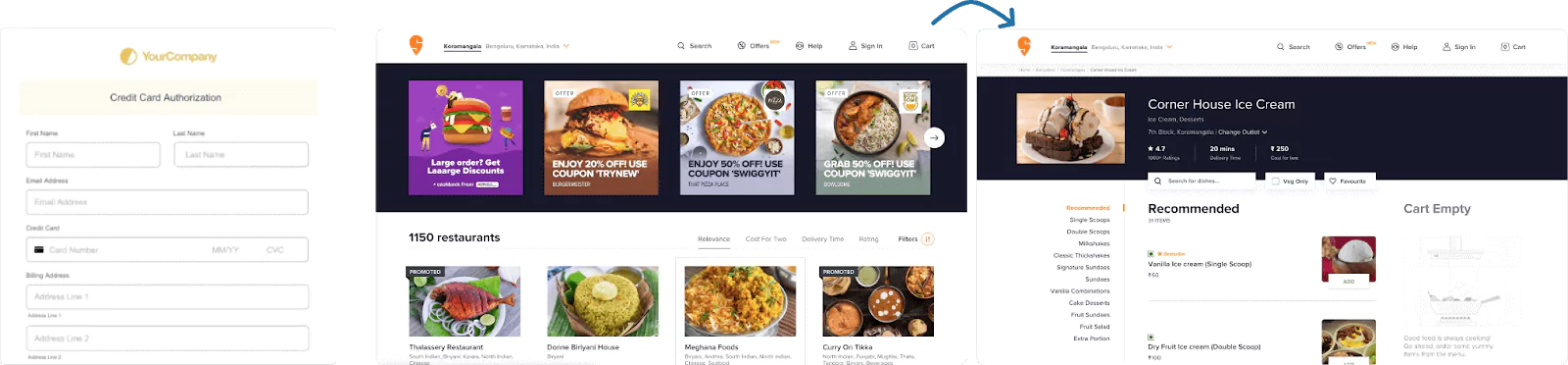
swiggy-UX-design

3. Difficulty of steps

The difficulty varies from person to person and also from the user's experience. He/She wouldn't mind spending more time on a step once it is explained why it is going to take longer. This is good as it could prevent errors from happening in the future.

Eg: While sending a large file as a goog
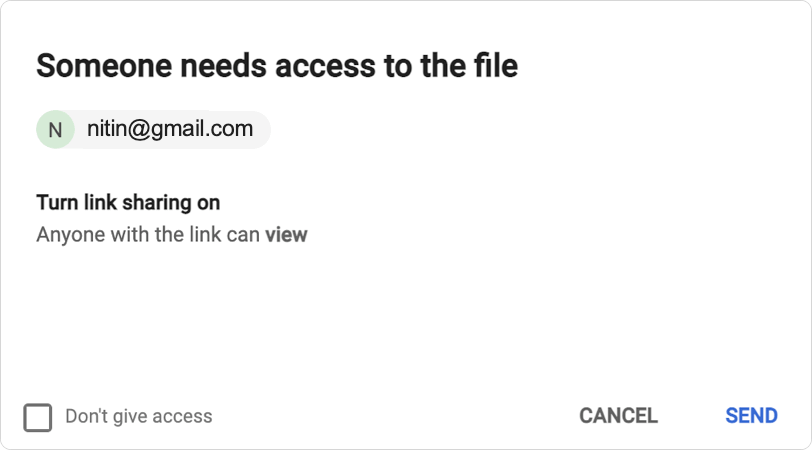
gmail-UX-Design

Takeaway

With these principles, you can substantially reduce the user's cognitive load and ensure they are not wasting their attention on unnecessary information that will leave them frustrated.

'The less they think about how they need to achieve their goal the more likely it is they will achieve it'- Steve Krug

As a leading UI/UX Design Agency in Bangalore with over 10 years experience in UI and UX design, we deliver you well-crafted design services that can bring your ideas to life and make your app stand out. Our UI/UX designers in Bangalore are personalized and crafted to suit the diverse needs of our customers.

Read Author's Other Blogs

MVPs Are Broken: Why Shipping Fast Is Killing Founder Clarity MCP is the New HTTP: How Appiness is Embracing the Future of AI Communication Role of AI in digital marketing - The Complete Guide Understanding Scroll Depth: How User Engagement Metrics Drive Website Optimization Unlocking Growth: The Importance of Digital Marketing in 2024 Target the Right Audience: Using Different Types of Keywords to Drive Traffic and Conversions What Is Keyword Research? The Key to Reaching Your Target Audience The Best AI Tools for Digital Marketing in 2024 The Best SEO Chrome Extensions for 2024 Role of Content Marketing in Digital Marketing Strategies: A Guide to On-Page SEO Mastery Website Performance Optimization: In Developer Perspective Top 5 Cross-platform App Development Frameworks in 2023 Structured Data in Advanced SEO Boost Conversions with Dynamic Remarketing in Google Ads Building Scalable and Cost-effective Applications with Serverless Node.js Storytelling: A key skill to be Mastered! APL 2023 as it happened The psychological phenomena of UX Design Master the Art of Storytelling with Motion Graphics The secret sauce of your social media content Bootstrap vs Tailwind CSS: Choosing the Right Front-End Framework for Your Web Development Project A game of cat and mouse: Privacy and Social Media Crawl Budget Optimization For Boosting Your Search Engine Visibility Level Up Your SEO Game Using Social Media SwiftUI: From Benefits to Building Login Screen Can SEO Practices Be Implemented in React? From A to अ: Why The Multilingual Content Marketing Matters Meme Marketing: Why Should You Take Memes Seriously? On-Page SEO Factors You Need To Know Why Does Page Speed Matter and How to Improve It? Google Core Algorithm Update Why Does The Healthcare Industry Need A Strong Marketing Team Social Media in Web 3.0 DISNEY VS. ANIME — DESIGN PERSPECTIVE Impact Of Digital Media On Movie Promotions Appiness Interactive is a Game-Changer in India’s UI-UX Space A Beginners Guide to Backlink Generation in 2022 Appiness Rewind 2021 Understanding Lifecycle methods of a React Native component What Is the Difference Between Black-Hat SEO and White-Hat SEO? A brief introduction about Interaction Design and its building blocks Cognitive Psychology Theories in UX : Understanding the Human Mind Be Imaginative, Be Artistic, and let's Engage with social media marketing strategies for 2021 Insight from an Appy Employee 12 Best Tools To Monitor Your Brand's Online Reputation Server-side Development with NodeJS Javascript vs Typescript. The war of types Reason(s) for the disconnect between the designer and a user Why Your Business Needs SEO in 2021? Content Management System (CMS); How CMS improves the effectiveness of your website 5 Best Skills SEO Content Writers Need to Succeed Importance of content for SEO and how they both complement each other UX trends in 2021 5 Tips to Energize your Boring SEO Reports How Featured Snippets Dominates More Search Clicks on Google Search Data-Driven Content Marketing In 2021 Top 5 Seo Trends in 2021 12 Best Ways To Use Video Content Marketing In Your Business Top 10 Content Marketing Trends for 2020 Artificial Intelligence in SEO An Unexpected Journey: How I Got Into Account Management Emotions, feelings, sentiments.. too mainstream? - A blog on Emotion based design A journey from Docker to Kubernetes for application deployment How to increase User Engagement? And How Gamification can help in User Engagement? Importance of Right Content in SEO and Social Media How To Rank Your Website #1 In Google With Top 8 SEO TRENDS 5 Tips To Help Grow Your Brand on Instagram What is Goal Gradient Effect and how can you apply its principles in UX? Ways To Speed Up Your Website and Improve Conversion Ways To Optimize Your Website For Local SEO 7 design psychologies every designer should know SEO-Friendly Content: The First Impression To Grab Audience Attention An Unexpected Journey : How I Got Into Digital Marketing? Link Building Strategies in 2019 - SEO Importance of Google Answer Box/ Featured Snippet in SEO
Next Blog Previous Blog All Blogs